

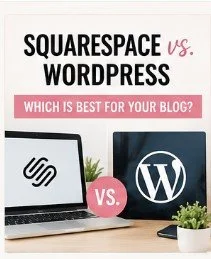
Squarespace vs WordPress: Which Platform Is Better for Beginners in 2026?
Published by This Mommy Stays Home
If you're ready to start a blog, one of the biggest decisions you'll make is choosing the right website platform.
The two names you'll hear most often are Squarespace and WordPress.
Both are excellent platforms, but they are built for different types of bloggers.
If you're wondering which one is right for you, this guide will walk you through the differences so you can confidently choose the best option for your goals.
Quick Answer
If your goal is...
✅ Start quickly with very little setup → Squarespace
✅ Build a blog that can grow into a full online business → WordPress
For most moms who want to earn income through blogging, WordPress is the better long-term investment.
What is Squarespace?
Squarespace is an all-in-one website builder.
Everything is included:
Website hosting
Templates
Security
Updates
Drag-and-drop editing
You don't have to worry about installing anything.
You simply sign up and begin building your website.
Pros of Squarespace
✔ Extremely beginner friendly
✔ Beautiful modern templates
✔ Easy drag-and-drop editor
✔ Hosting included
✔ Minimal maintenance
✔ Excellent for portfolios and small business websites
Cons of Squarespace
✘ Fewer customization options
✘ Limited plugins
✘ Harder to grow into a large blogging business
✘ Less control over SEO
✘ Switching away later can be difficult
What is WordPress?
WordPress is the world's most popular website platform.
Over 40% of all websites on the internet use WordPress.
Instead of an all-in-one builder, WordPress lets you build your website exactly how you want.
You'll purchase hosting separately, install WordPress (usually with one click), and customize your site using themes and plugins.
Pros of WordPress
✔ Unlimited customization
✔ Thousands of themes
✔ Over 60,000 plugins
✔ Excellent SEO capabilities
✔ Easy to monetize
✔ Great for affiliate marketing
✔ Perfect for digital products
✔ Built to scale as your business grows
Cons of WordPress
✘ Slight learning curve
✘ Requires hosting
✘ Needs occasional updates
✘ More options can feel overwhelming at first
Cost Comparison
ExpenseSquarespaceWordPressDomainIncluded or purchased separatelyPurchased separatelyHostingIncludedSeparate hosting requiredMonthly Cost$16–$49/monthAround $5–15/month with beginner hostingThemesIncludedThousands of free & premium optionsPluginsLimitedNearly unlimited
Although Squarespace looks simpler, WordPress can actually be less expensive over time.
Design Flexibility
Squarespace
Squarespace is known for its stunning templates.
If you don't want to customize much, you'll love it.
Everything looks polished right out of the box.
Perfect for:
Photographers
Artists
Coaches
Small businesses
WordPress
WordPress gives you almost unlimited design freedom.
Want:
Recipe blog?
Coupon site?
Membership site?
Online course?
Shop?
Digital downloads?
WordPress can do all of it.
Blogging Features
Squarespace
Includes blogging tools like:
Categories
Tags
Comments
Scheduling
Basic SEO
Enough for hobby bloggers.
WordPress
Built specifically for blogging.
You'll get:
Advanced categories
Tags
SEO plugins
Affiliate tools
Email integrations
Pinterest plugins
Analytics
Content scheduling
Internal linking tools
Perfect for serious bloggers.
SEO Comparison
If your goal is getting traffic from Google...
WordPress wins.
SEO plugins like Rank Math or Yoast make optimizing every post incredibly easy.
Squarespace includes basic SEO features but doesn't offer nearly as much flexibility.
Monetization
If you're hoping to make money blogging, WordPress offers far more options.
With WordPress you can easily sell:
Printables
Digital planners
eBooks
Courses
Memberships
Templates
Affiliate products
Sponsored content
Squarespace supports many of these features, but you'll often run into more limitations as your business grows.
Ease of Use
Squarespace
⭐⭐⭐⭐⭐
You can build a website in a single afternoon.
Everything works together without much setup.
WordPress
⭐⭐⭐⭐☆
There is a learning curve during your first week.
Once you understand how themes, pages, and plugins work, it's surprisingly easy to manage.
Which Platform Grows With You?
Imagine your blog becomes successful.
You want to:
Sell courses
Add a shop
Start email marketing
Create memberships
Build funnels
Hire writers
Add forums
Launch digital products
WordPress handles all of this with ease.
Squarespace can do some of these things, but you'll likely outgrow it over time.
Which Platform Do I Recommend?
For moms who simply want a beautiful website to share family updates or a small business, Squarespace is a wonderful choice.
But if your dream is to:
Leave your 9-to-5
Earn passive income
Sell printables
Start an online business
Build long-term financial freedom
I recommend WordPress every time.
It's the platform used by many full-time bloggers because it gives you the flexibility to grow without needing to rebuild your website later.
My Favorite Beginner Setup
If I were starting over today, here's what I'd choose:
Platform: WordPress
Hosting: Beginner-friendly hosting provider
Theme: Lightweight, mobile-friendly theme
Plugins:
Rank Math (SEO)
WPForms (Contact Forms)
LiteSpeed Cache or WP Super Cache (Performance)
UpdraftPlus (Backups)
This setup is affordable, beginner-friendly, and gives you plenty of room to grow.
Final Thoughts
Choosing between Squarespace and WordPress comes down to your goals.
If you want the easiest path to getting a beautiful website online quickly, Squarespace is an excellent option.
If you want to build a blog that can eventually replace your income, WordPress gives you the flexibility, tools, and scalability you'll need.
Remember, your blog doesn't have to be perfect on day one. The most important step is simply getting started. Every successful blogger began with that very first post.
Frequently Asked Questions
Is WordPress really free?
Yes. The WordPress software is free, but you'll still need to pay for hosting and a domain name.
Is Squarespace easier for beginners?
Yes. Squarespace is one of the easiest website builders to learn because everything is included in one platform.
Can I switch from Squarespace to WordPress later?
Yes, but it can take time to migrate your content and redesign your site. If you already know you want to build a blogging business, starting with WordPress can save you work later.
Which platform is better for making money blogging?
For most bloggers, WordPress offers more flexibility for affiliate marketing, digital products, email marketing, SEO, and long-term growth.
🌸 Ready to Start Your Blog?
If you're dreaming of creating a flexible income from home, don't let choosing a platform hold you back.
Download my Free Blogging Resource Guide for beginner-friendly tools, step-by-step recommendations, and the resources I wish I had when I started.
Your blogging journey starts with one simple step—and today is a great day to take it.
